Consular Mobile Service (Covering Nice, Monaco, Cannes and Southern France)
Saturday, 21 November 2026, from 9:00 a.m. to 5:00 p.m., at Salle Le Petit Rene, 5 Boulevard des Moneghetti, 06240 Beausoleil, France.
ප්රංශයේ ශ්රී ලංකා ප්රජාතාන්ත්රික සමාජවාදී ජනරජයේ තානාපති කාර්යාලය
பிரான்சிலுள்ள இலங்கை ஜனநாயக சோசலிச குடியரசின் தூதரகம்
Embassy of the Democratic Socialist Republic of Sri Lanka in France

Learn photo requirements for applying or renewing your passport with a paper form.
What to know before you start
Unacceptable photos are the number one reason why we put passport applications on hold. Review the guidelines and photo examples to learn what makes a photo acceptable.
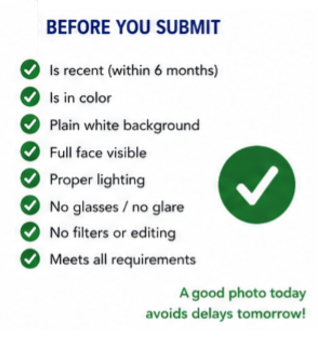
- Submit 1 color photo taken in the last 6 months.
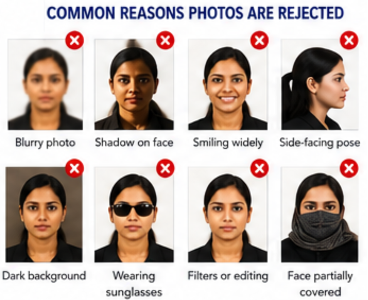
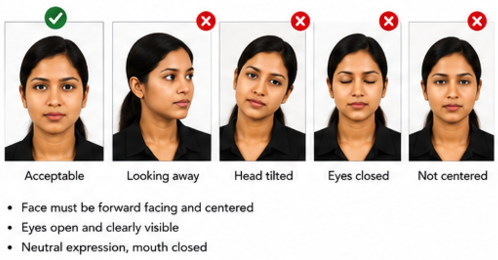
- Directly face the camera without tilting your head.
- Position yourself several feet away from the camera with your head centered and head fully visible.
- Face the camera directly with a neutral expression, both eyes open and visible, and mouth closed.
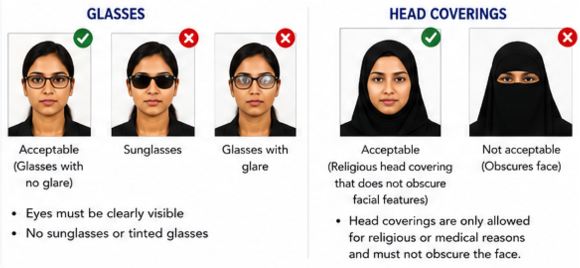
- Remove anything covering your face unless for documented religious or medical reasons.
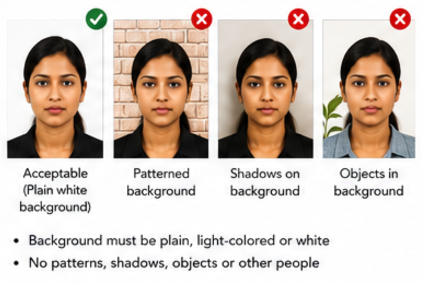
- Use a plain white or off-white background free of shadows, textures, or objects.
- Submit the original, unedited photo without filters or digital changes.
Photo requirements and examples
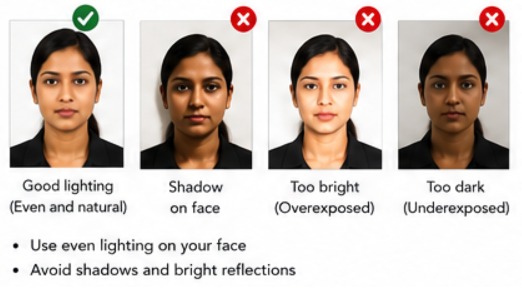
Lighting and shadows
- Have uniform lighting on your face.
- Make sure lighting isn’t too bright which can make your image overexposed, or too dim which can make your image underexposed.
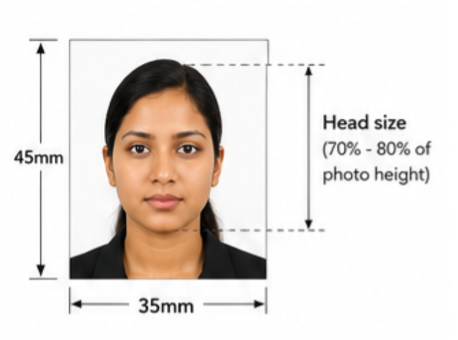
Size and position
- Make sure your head and shoulders are centered in the photo.
- Position yourself several feet away from a white background or wall. If the person taking your photo is standing too close or too far away, your head may not be the correct size.
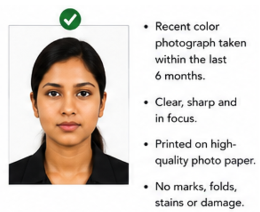
Resolution and quality
- Submit a high-resolution color photo that is not blurry, grainy, or pixelated. The photo should not have visible printer dots.
- Print your photo on matte or glossy photo-quality paper.
- Do not submit photocopies or digitally scanned photos.
- Do not submit photos with red eye.
- Do not submit a damaged photo with holes, creases, or smudges.
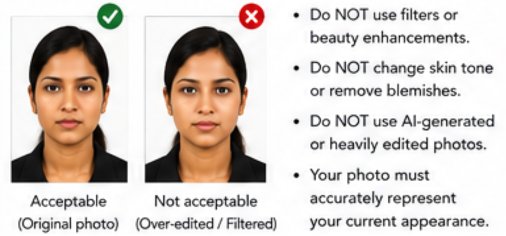
Digital changes
- Submit the original, unchanged photo.
- Do not change your photo using computer software, phone apps or filters, or artificial intelligence.
Pose and expression
- Face the camera directly with your full face in view and head not tilted.
- The colored portions of your eyes must be clearly visible. Make sure that your eyes are not obstructed or covered by your hair.
- Avoid exaggerated facial expressions. You can smile in your photo. Just make sure your eyes are open and your mouth is. closed.
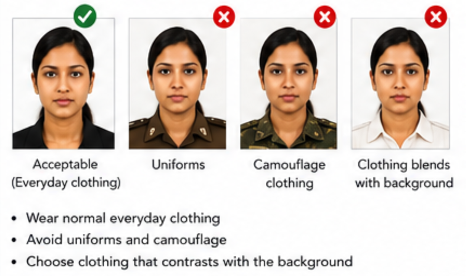
Clothing, hats, and glasses
- Take off any eyeglasses, sunglasses, or tinted glasses. Do not rest them on your head for the photo.
- Take off your hat or head covering.
- You cannot wear a uniform, clothing that looks like a uniform, or camouflage clothing.
- You cannot wear headphones or wireless hands-free devices in or on your ears.
- You can wear jewelry and keep on your facial piercings as long as they do not hide your face.
Background
- Background must be white or off-white, free of shadows, and plain without texture, objects, or lines.
- Position yourself several feet away from the wall.
- If you are sitting in a wheelchair, it is okay if part of the head support is in the photo. Include a note with your application that explains that your background is not completely white because you are in a wheelchair.
Babies and toddlers
- For background, place your child on a plain white or off-white sheet. You can also cover a car seat with the sheet, then place your child in the car seat for the photo.
- Make sure there are no shadows on your child's face.
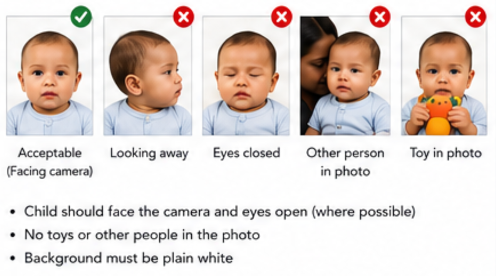
- No other person can be in the photo.
- The child must face the camera.
- The child's facial expression must be neutral.
- The child’s full face must be visible.
- It is okay if a baby's eyes are not entirely open. All other children must have their eyes open.